
This post was generated using Claude because, what better engine to consult about the nature and state of experimental Claude Code functionality? That said, I realize a number of readers take issue with using AI to assist writing. To help identify such content on this blog, I’ve introduced a new tag: “AI Slop.” This post is thus tagged.
set CLAUDE_CODE_EXPERIMENTAL_AGENT_TEAMS=1
One Line
You use Claude Code. One session. One context window. One worker grinding through your codebase in order.
Maybe you use subagents. Good. Subagents go do a focused thing and report back… like good and useful interns.
This post is about one line:
set CLAUDE_CODE_EXPERIMENTAL_AGENT_TEAMS=1
claude
That line turns on agent teams.
And agent teams are not interns.
They are a team.
What Agent Teams Are
An agent team has four parts:
- A team lead. Your main Claude Code session. It spawns teammates, builds the task list, and synthesizes results. In my experience, the Claude Code session replaces the orchestrator in a harness. (Assuming you’ve used – or even read about – agentic harnesses…)
- Teammates. Each one is a full, independent Claude Code session with its own context window. Not a helper inside your session. A whole other Claude.
- A shared task list. Tasks are pending, in progress, or completed. Tasks can depend on other tasks. A blocked task cannot be claimed until its dependencies finish. Teammates self-claim the next unblocked task when they finish one, and claiming uses file locking so two teammates don’t grab the same work.
- A mailbox. Teammates message each other directly. By name. No routing everything through the lead.
That last part is the difference that matters.
| Subagents | Agent teams | |
|---|---|---|
| Who talks to whom | Report back to the caller | Teammates message each other directly |
| Who coordinates | The main session manages everything | Self-coordination plus a shared task list |
| Best for | Focused tasks where only the result matters | Work that needs discussion, disagreement, and handoffs |
| Token cost | Lower | Higher. Each teammate is a separate Claude |
You can also talk to any teammate yourself, without going through the lead.
Turning It On
The feature is experimental and off by default. Update Claude Code first (claude --version; agent teams need v2.1.32 or later, and newer is better).
Then pick your flavor.
Windows Command Prompt (this window only):
set CLAUDE_CODE_EXPERIMENTAL_AGENT_TEAMS=1
claude
PowerShell (this window only):
$env:CLAUDE_CODE_EXPERIMENTAL_AGENT_TEAMS = "1"
claude
bash / zsh:
export CLAUDE_CODE_EXPERIMENTAL_AGENT_TEAMS=1
claude
Every session in one repo – put it in <repo>\.claude\settings.local.json
Note: Claude wrote “on Windows, %USERPROFILE%\.claude\settings.json“.
I disagree and use “on Windows, <repo>\.claude\settings.local.json” instead.
I can hear some of you thinking,
“Why <repo>\.claude\settings.local.json, Andy?”
That’s an excellent question. I’m so glad you asked!
%USERPROFILE%\.claude\settings.json would modify settings for every Claude Code session your user account runs on your / my image (laptop, VM, container, etc.). Adding a “.claude” subdirectory to your repo, and then adding a settings.local.json file to that subdirectory, will override settings from broader scopes – %USERPROFILE%\.claude\settings.json, which is the broadest scope for a user on an image, included.
Claude Code wrote this settings.local.json for me at first. (I later moved the flag into a launcher – more on that below.):
{
  "env": {
    "CLAUDE_CODE_EXPERIMENTAL_AGENT_TEAMS": "1"
  }
}
The global (USER) settings file is tempting. Set it once, forget it. But it turns teams on for every session, and that has a cost I’ll get to in a minute. settings.local.json is scoped to one repo. Your other projects never see it. That turns out to be a feature.
A Note for Windows Folks
Agent teams have two display modes.
- In-process (the default). All teammates run inside your main terminal. They show up in an agent panel below the prompt. Up and down arrows select a teammate. Enter opens its transcript so you can message it. Escape clears the selection, but while you’re viewing a teammate, it interrupts that teammate’s work. Ctrl+T toggles the task list.
xstops a selected teammate. Works in any terminal. - Split panes. Each teammate gets its own pane. Requires tmux or iTerm2. Not supported in Windows Terminal or the VS Code integrated terminal. Durnit!
So on Windows, in-process it is. That’s fine. The panel is good.
You’ve Seen This Before
Here’s the part that makes me all giggly inside:
- A lead that hands out work.
- Workers that each run in their own isolated context.
- A task list with dependencies, so step C waits on steps A and B. (i.e. orchestration, baby)
- Quality gates that can refuse to let a task be marked complete.
If you’ve built an SSIS framework, you recognize these patterns:
- It’s a controller package.
- It’s child packages.
- It’s precedence constraints and execution order stored as metadata.
- It’s the recon (reconciliation) gate that won’t let the load proceed until the validation passes.
Claude Code even ships the gates. Hooks named TeammateIdle, TaskCreated, and TaskCompleted run at those moments, and exiting with code 2 sends feedback and keeps the work from moving forward.
That’s a precedence constraint with an opinion.
One real difference:
SSIS child packages don’t argue with each other.
Teammates do.
And that turns out to be the point. (Read more of my thoughts about playing nice with others.)
A First Team for Data Engineers
The documentation recommends starting with research and review, not code changes. That’s good advice. Parallel writes are where teams get into trouble.
So point a team at a folder of SSIS packages (they’re XML; Claude reads them just fine) and try something like this:
Spawn three teammates to review the SSIS packages in this folder.
Name them errors, performance, and deployment.
- errors: error handling, event handlers, logging
- performance: data flow design, lookups, blocking transformations
- deployment: parameters, connection managers, environment configuration
Have them challenge each other's findings before reporting.
Do not change any files.
Naming the teammates matters. You can address them by name later (“ask performance to look at Load_FactSales.dtsx again”).
The “challenge each other” line matters more. One reviewer finds one plausible problem and stops. Three reviewers trying to disprove each other find the problem that survives.
How I (I Mean, Claude Code) Set Mine Up
Confession first. My first attempt was the bash one-liner, CLAUDE_CODE_EXPERIMENTAL_AGENT_TEAMS=1 claude, typed into a Windows command prompt. cmd told me it had never heard of that command. My second attempt was claude --teammates ux,backend,adversary. There is no --teammates option. Claude Code told me so, more politely than cmd.
You don’t list teammates on the command line. You turn the feature on, then ask for teammates in plain language.
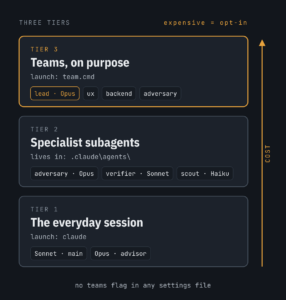
Once I stopped guessing, I (I mean, Claude Code) set up my framework repo in three tiers. One rule drives all three: the expensive thing is opt-in.
Tier 1: The Everyday Session
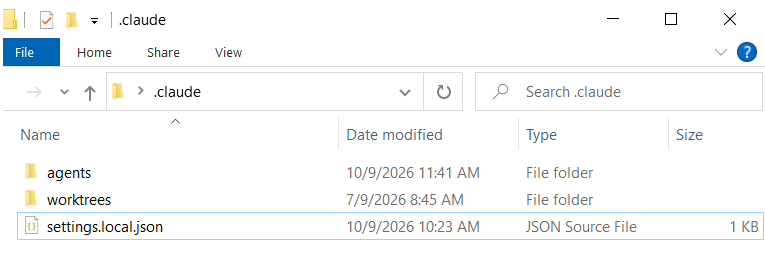
Most work doesn’t need a team. It needs one capable session that doesn’t burn tokens. The local repo’s settings JSON file: <repo>\.claude\settings.local.json:
{
  "model": "sonnet",
  "advisorModel": "opus",
  "permissions": {
    "allow": [
      "Bash(git status)",
      "Bash(git diff:*)",
      "Bash(dotnet build:*)",
      "Bash(dotnet test:*)"
    ]
  }
}
Sonnet does the routine work. Opus typically weighs in as an advisor at decision points: before committing to an approach, on recurring failures, before declaring a task done. Pre-approving build and test commands stops the permission prompts for those commands during long runs. See Configure permissions for more information.
A word about those allow rules. They match command text, not intent.
Bash(dotnet build:*) approves dotnet build with any arguments. It does not approve dotnet.exe build. It does not approve dotnet build && something-else either, because Claude Code checks every part of a chained command, and every part has to match a rule.
And on Windows there’s a wrinkle. Bash rules cover the Bash tool. Claude Code also has a PowerShell tool, and PowerShell commands need their own rules: PowerShell(dotnet build *).
How do you know which one you need? Watch. When a command prompts, the prompt shows the tool and the exact command. That tells you which rule is missing.
Notice what’s missing. The agent teams flag is not in this file. That’s on purpose.
Tier 2: Specialist Subagents
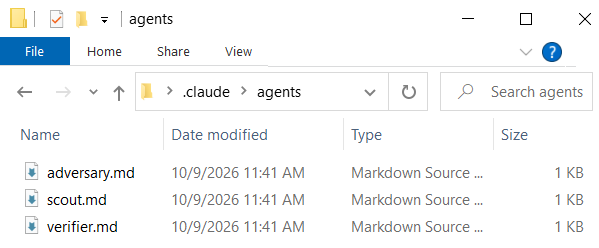
Reusable roles live in <repo>\.claude\agents\, one markdown file each. I have three:
- adversary (Opus, read-only plus Bash). A hostile reviewer. Assumes the change is wrong until proven otherwise. Stored in
<repo>\.claude\agents\adversary.md. - verifier (Sonnet, Read and Bash only). Runs the build and tests. Reports exact pass/fail output. No interpretation. Stored in
<repo>\.claude\agents\verifier.md. - scout (Haiku, read-only). “Find every place X is referenced.” Cheap lookups.
- Stored in
<repo>\.claude\agents\scout.md.
Here’s the adversary:
---
name: adversary
description: Use before any PR, merge, or release. Attacks the change: security, failure paths, contract violations, claims not backed by evidence.
tools: Read, Grep, Glob, Bash
model: opus
---
You are a hostile reviewer for this framework. Assume the change is wrong
until proven otherwise. Check: failure paths actually report failure; recorded
status matches observable reality; inputs crossing a platform boundary are
validated; nothing is marked done that wasn't run. Report findings by severity.
Do not edit files.
As subagents, they report a summary back to my session. Cheap. And the same files work as teammate roles when I do want a team.
One thing a ‘guide’ I found online got wrong: don’t hand-write anything in %USERPROFILE%\.claude\teams or %USERPROFILE%\.claude\tasks. That’s runtime state. Claude Code generates it and overwrites your edits.
Roles go in <repo>\.claude\agents\.
Tier 3: Teams, On Purpose
Here’s the cost I promised. Claude names subagents on its own so it can message them later. With the agent teams flag on, a named subagent launches as a teammate. So with the flag in any settings file, teams can form when you didn’t ask for one. Every teammate is a full session. You pay for each.
So the flag lives in a launcher. team.cmd in the repo root turns teams on and makes Opus the lead:
@echo off
setlocal
set CLAUDE_CODE_EXPERIMENTAL_AGENT_TEAMS=1
claude --model opus %*
Plain claude gets me Tier 1, no teams. team gets me teams with an Opus lead. Then I ask for a team:
Create an agent team with three teammates.
Name them ux, backend, and adversary; use the adversary agent type for adversary.
ux focuses on the user experience of [the thing you're working on].
backend focuses on implementation and architecture.
adversary tries to break or disprove whatever the other two propose.
Use Sonnet for ux and backend.
Teammates don’t see my conversation with the lead. The spawn prompt is all the task context they get, so I put the task in it.
Where teams earn their keep in my repo: platform adapters live in separate files, so one teammate per adapter can build in parallel without overwriting each other. And design debates, where backend and adversary argue over an execution-model decision.
Guardrails
- Keep CLAUDE.md short. Every teammate and subagent loads it. Every extra line gets paid for once per agent. Build commands, conventions, and the “adversary review before PR” rule go there. Everything else goes in docs Claude reads when it needs them.
- Hooks, not rules, where it matters. Use a
TaskCompletedhook that runs the tests and exits with code 2 on failure. The task cannot be marked complete while tests fail.
A CLAUDE.md rule asks.
A hook enforces.
Data engineers know the difference between a convention and a constraint.
Best Practices (and Things That Will Bite You)
It’s experimental. Experimental means some of this:
- Tokens. Every teammate is a separate Claude with its own context window. Cost scales with team size. Start with three to five teammates. Three focused teammates beat five scattered ones.
- Same-file edits. Two teammates editing one file means overwrites. Give each teammate its own files.
- Teams you didn’t ask for. With CLAUDE_CODE_EXPERIMENTAL_AGENT_TEAMS set to
1, a subagent Claude names on its own launches as a teammate. If you want plain subagents back, set CLAUDE_CODE_EXPERIMENTAL_AGENT_TEAMS to0. - Interactive only. Run
claude -p(headless, including Agent SDK sessions) and you get subagents, not teammates. - Resume doesn’t bring them back.
/resumeand/rewinddon’t restore in-process teammates. The lead may try to message teammates that no longer exist. Tell it to spawn new ones. - One team per session. No nested teams. The lead is the lead for life.
- Permission prompts land on the lead. Pre-approve the common stuff in your permission settings or you’ll be clicking a lot.
- The lead gets impatient. Sometimes it starts doing the work itself instead of waiting. Tell it: “Wait for your teammates to complete their tasks before proceeding.” Sometimes it declares victory early. Tell it to keep going.
I have managed people. This list is familiar.
The Verdict
Software engineering spent years teaching AI to work alone. Now it’s teaching AI to work as a team: a lead, a task list, dependencies, gates, and a way to say “I think you’re wrong.”
Data engineering called that orchestration. We’ve been running it in production for twenty years.
One line to try it.
Andy :{>
This feature is experimental and changing fast.
Details current as of the date written (10 Oct 2026).
The source of truth is the Claude Code agent teams documentation.

Comments