
You know which server is Dev. You have known for years. It is the one with the instance name that almost matches the naming convention, the one that was supposed to be temporary, the one everybody just knows.
Until the new developer starts. Or the instance moves. Or you are three windows deep in a deployment at 4:45 on a Friday and two connection strings differ by four characters, and one of them is Production.
If you manage data integration across environments, some of this will feel familiar:
- Connection details live in your head, in OneNote, in a wiki page last updated two contract cycles ago
- Onboarding a developer means forwarding a list of server names and hoping it is current
- The same instance serves development, deployment, and administration, and nothing in the tooling tells you which hat you are wearing
- A server migration means updating the same connection string in every tool, and finding out later which one you missed
- “Which database is that again?” is a question someone asks every week
None of this is a you problem. It is a vocabulary problem, and it is systemic.
Software engineering solved this years ago. Application developers stopped hardcoding server names decades back. They connect to named environments – Dev, Test, Staging, Prod – and configuration resolves the name to infrastructure. The name carries the intent. The infrastructure is an implementation detail.
Data integration mostly didn’t. We borrowed the tools and skipped the pattern. Our tools still ask for a server and a database, and we still answer with trivia.
I have written before that you can’t govern what you can’t name. Connections are the clearest case I know. “d2\Dev” tells you where you are connecting. “DILM Dev” tells you why. One is an address. The other is a word in a working vocabulary – and vocabulary is the first rung on the ladder to governance and trust.
So we built the missing piece.
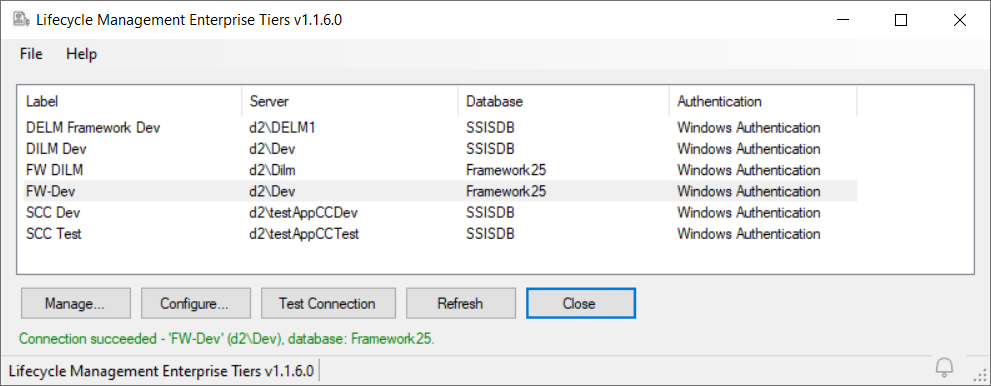
Lifecycle Management Enterprise Tiers (LM Enterprise Tiers, or LMET) is a free utility for DILM Suite and DELM Suite. It manages an enterprise-wide database of labels – short, descriptive names for your lifecycle management tier connections. “EDW Dev.” “Sales Prod.” “SCC Test.” Define the label once, and the label becomes the connection.
A few things follow from that:
One registry, every tool. SSIS Framework Manager, SSIS Catalog Compare, and the DILM Deployment Utility all accept LM labels and use them to connect. When a server moves, you update the registry once. Every tool follows.
Labels carry function, not just location. You can define the same connection string under different labels – one for development, one for deployment, one for administration. The purpose of the connection is visible before anyone connects. And when those functions later separate onto different instances, as they do in maturing enterprises, the labels are already in place. The migration is a registry edit, not a re-education.
Tiers become promotable. Because labels identify tiers, moving artifacts from Dev to Test to Prod is a movement between names, not between strings that look nearly identical. The 4:45-on-a-Friday failure mode gets structurally harder to hit.
New people learn words, not topology. “Connect to DILM Dev” is a first-day instruction. A spreadsheet of instance names is a liability.
LM Enterprise Tiers is a free download. No signup required. It is available now on the LM Enterprise Tiers product page.
Name the connection. The server name was never the point.
:{>
P.S. LM Enterprise Tiers is free and always will be. The tools that consume its labels are how DILM Suite pays the bills. If you are managing SSIS catalogs across lifecycle tiers today, SSIS Catalog Compare is the place to start – it compares, scripts, and deploys SSIS catalog contents between the tiers LMET names. If you are orchestrating SSIS at enterprise scale, look at the SSIS Framework.

Comments